

Services
One advisor for your network and security.
DeF-Sec handles the assessment, the design and the oversight. Vetted vendors handle the build and the around-the-clock work. You get one technical advisor who knows how all of it fits together.
Delivered by DeF-Sec
The thinking, the plan, and the accountability.
Network assessment
We walk the building and record what is connected, how, and which paths are open.
You get: a written account of your network as it stands.
Firewall and VLAN design
Guests, card terminals and office computers on separate networks, each reaching only what it needs.
You get: the plan and the firewall rules, each with its reason.
Wi-Fi planning
Access points placed for the rooms people actually use, with the signal kept where it belongs.
You get: where each access point goes and what it carries.
Vendor selection and quotes
We write down what the job needs, get quotes from vetted vendors, and compare them side by side.
You get: a recommendation with the reason for it. You make the call.
Project oversight
We manage the vendor, keep the job on track, and check the finished work against the plan.
You get: a job checked against the plan before it is signed off.
Documentation
What is on your network, how it connects, and why each decision was made, written down.
You get: documentation you keep, whether or not you call us again.
Through vetted vendors
Specialists who build and run it, vetted by DeF-Sec.
Installation and cabling
Cabling, switches, access points and firewalls installed to the DeF-Sec design.
You get: a clean install, checked against the plan.
Who does what: DeF-Sec writes the design and oversees the job. The vendor installs.
Penetration testing
Asked for a test by an insurer, an auditor or a customer? A tester tries to reach what should be closed.
You get: a written report you can hand to whoever asked.
Who does what: DeF-Sec sources the tester and scopes the test.
Managed detection and response
A 24/7 security operations center (SOC), backed by a SIEM that collects and correlates the logs, watches your network and devices and responds when something does not belong.
You get: a security team around the clock, without hiring one.
Who does what: DeF-Sec matches the service to your size and budget. The provider’s SOC sends the alerts and handles incident response.
Virtual CISO (vCISO)
A virtual Chief Information Security Officer: a person who sets the security priorities for the business and keeps them current, without being on the payroll.
You get: security priorities, written down and kept up to date.
Who does what: DeF-Sec sources the vCISO.
Backup and power protection
Copies of the files and systems you name, so the building does not hold the only copy, plus battery backup (UPS) so a surge or outage does not take out your equipment.
You get: backups you can restore and equipment that rides out outages.
Who does what: DeF-Sec says what has to be covered and sized. The vendor sets it up.
Internet and voice
The internet connection into the building and the phone service that runs on it. Traditional VoIP or a cloud phone system: we sort through the options so you do not have to.
You get: a short list matched to your building, with a recommendation.
Who does what: DeF-Sec compares the options. A vetted vendor supplies it.
Methodology
How a DeF-Sec design comes together.
Industry-standard practice, written down so you can see every decision before anything changes.
Scope and documentation
Every project starts by scoping exactly what you need. Then we map and document your network in a plan you review before any change is made.
VLAN segmentation
Devices are split into separate networks, so one infected laptop cannot reach the card terminal or the file server.
- Firewall admin
- Switches
Admins only
- File server
- Backups
Staff, by group
- Workstations
- Laptops
Files and internet
- Card terminals
- Registers
Card processor only
- Printers
- Smart TVs
Updates only
- Guest Wi-Fi
- Contractors
Internet only
Without VLANs: one infected laptop can reach all of it.
Firewall configuration
Rules are built on least privilege: start from default deny, open the service and not the whole network, and record the reason for every rule.
Firewall methodology — how a rule earns its place
The order the work happens in, and what the finished ruleset looks like.
Inventory first
Every device on the network, and what it legitimately needs to reach. You cannot write rules for traffic you have not identified.
Start at default deny
The baseline is that nothing is allowed. Rules are exceptions you argue for, not defaults you inherit from the box.
Open the service, not the network
Staff get the file server. Not everything else that happens to sit beside it. The less a device can reach, the less it can damage if it gets infected.
Document the reason
Every rule carries why it exists. A rule nobody can justify is a rule that gets removed at the next review, not grandfathered in.
| SOURCE | DESTINATION | SERVICE | ACTION | WHY |
|---|---|---|---|---|
| Staff | Servers | SMB (v3), HTTPS | ALLOW | Staff need their shared files. Being on the network is not enough — your group decides which folders open. |
| Staff | Management | — | DENY | Nobody should be able to change the firewall from a regular laptop. |
| POS | Payment processor | HTTPS | ALLOW | A register only needs to reach the card company. |
| POS | Any other VLAN | — | DENY | A register has no reason to touch anything else. |
| IoT | Internet | HTTPS, NTP | ALLOW | Smart devices get updates and the clock. Nothing else. |
| IoT | Servers, Staff, POS | — | DENY | A smart TV should never reach your files or your registers. |
| Guest | Internet | Web only | ALLOW | Visitors get Wi-Fi, not your network. |
| Any | Any | Any | DENY | Everything not listed above is blocked. That is the default, not the exception. |
Everything not listed above is blocked by default — the last rule is what is really doing the work. And getting on the network is not the same as getting access: a staff laptop can reach the file server, but which folders open is decided by who the person is.
Wi-Fi planning
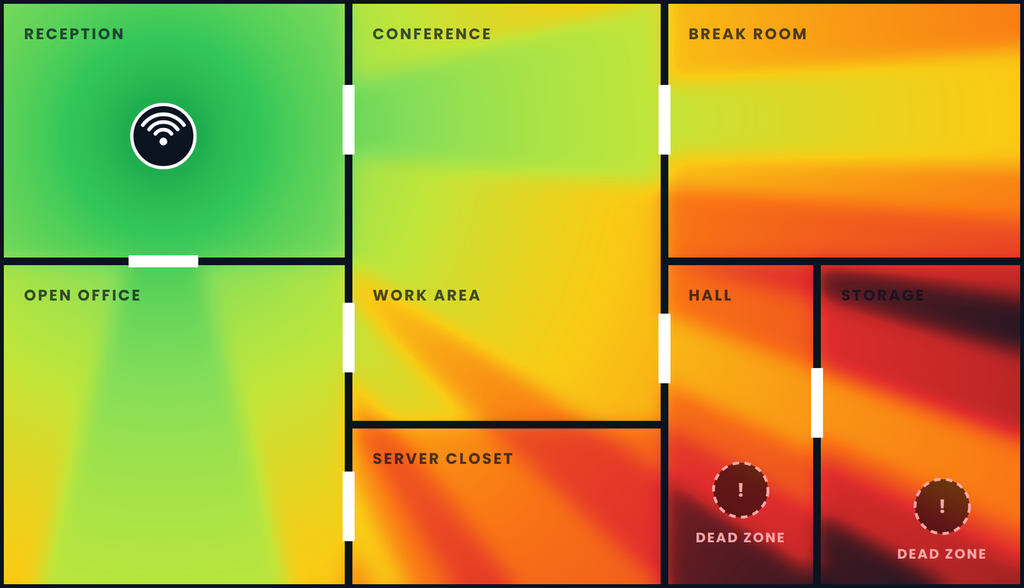
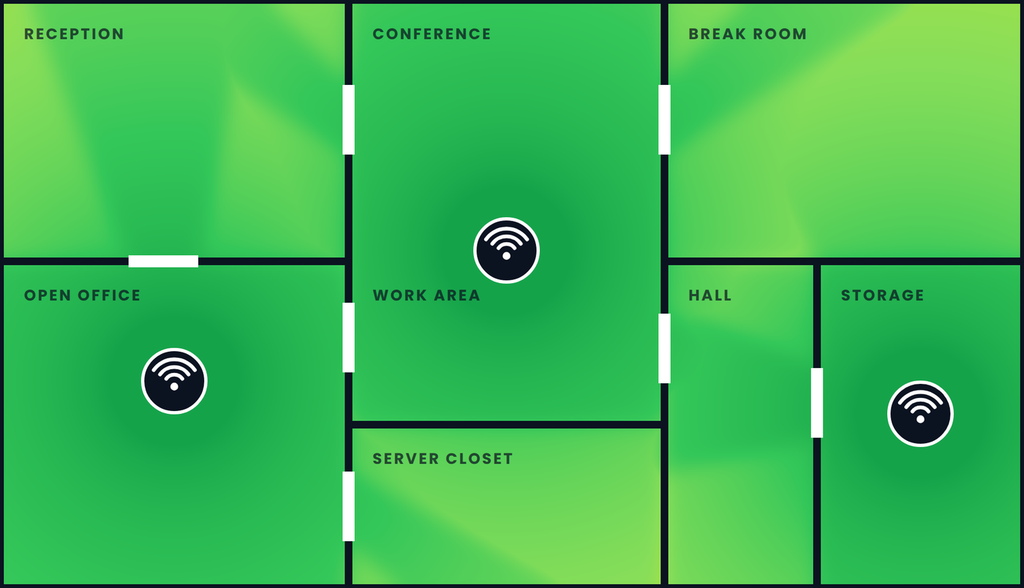
Access points are placed for the rooms people actually use. Compare one router in a closet with three placed access points.
One router vs. three placed access points
Same building, same walls. Drag the handle to see what changes.
Start with a conversation.
Tell us what is going on with your network. We will tell you honestly whether we can help.